System is the sidebar section for the console itself. It is shown to an administrator. It does not change Filter or MLC settings. Those are Web server and WAF settings.
The first administrator is created on the server with createadmin. See WMC.
¶ Users
Users is the list of accounts that can sign in. Filters narrow the list by role, status two-factor authentication. Search matches the address and the key name in the CID column. Filter by role leaves space after Administrator.
Each row is the address, the provider (a local account or LDAP), the role, the status, whether 2FA is on, the CIDs the account may use the domains. Add user creates an account: email, password for a local account, or an LDAP account picked from the directory, plus status, role, CIDs, domains an optional IP access restriction. The role list is wide enough to show Administrator. The LDAP account list opens wide enough to show the whole address. A local password is entered twice. Hover Password for the rules: at least 8 characters, with an uppercase letter, a lowercase letter, a digit, and a symbol. Leave the restriction empty to allow sign-in from any address. IPv4, IPv6 CIDR ranges are allowed.
Editing an account changes the same fields. An added CID is a chip, the same shape as an IP restriction. Two-factor authentication shows whether 2FA is set up. Reset 2FA makes the user set it up again at the next sign-in. Allow to generate reports turns CSV and PDF reports on for that account. Action log on the account is the history of changes to it. Date, Action, E-mail and IP stay at the top of that list while the rows scroll.
A non-administrator account can also be created on the server with createuser.
¶ SMTP
SMTP is the mail server the console uses for notifications and other messages. Active turns sending on without deleting the saved settings.
The fields are the SMTP host, the port, encryption (none, TLS, or SSL), the username, the password, and the From address. From address is required. Send without authentication disables the username and the password and sends without a login. Leave the password empty when saving to keep the current password. Saving does not show a confirmation. Test reports when the message is sent.
¶ LDAP
LDAP connects the console to Active Directory or another LDAP directory. The login page then offers Use LDAP an administrator can pick an LDAP account when adding a user.
Active turns the directory on. The fields are the LDAP server, the port, Use SSL (LDAPS, or STARTTLS on port 389), Ignore SSL certificate, the base DN, the user DN the password. Leave the user DN and the password empty to bind anonymously. Leave the password empty when saving to keep the current password. Saving does not show a confirmation. Test checks the connection before saving and reports when it succeeds.
¶ API
API sends Event Collector events to a Syslog collector (QRadar, ArcSight, or another listener that accepts CEF). The settings apply to the product key selected in the header.
Active turns sending on. The fields are the Syslog server, the port, the protocol (Syslog TLS or Syslog TCP), Event Collector, Verify TLS certificate an optional CA certificate. TLS usually uses port 6514. TCP usually uses port 514. Leave the CA empty to use the system trust store. Saving does not show a confirmation.
An event is marked delivered when the collector accepts the frame. A failed connection is retried. Events that were already delivered are not sent again. Check connection opens that same connection from the API host and writes one test frame. It uses the address on the page and does not save it. A successful check means the collector accepted the bytes. It does not confirm that the SIEM parsed the event. The API for the same object is API settings.
¶ Backups
Backups lists restore points of agent settings. A page under WAF settings or Web server writes a restore point with Backup. Here an administrator restores a point or compares it with the current settings of that CID. Restore asks for confirmation and says that the current settings are saved as a new backup first. Compare opens a wide view of the two copies. A timestamp on either side is shown as a date and time, the same way as the date in the list. Scroll together moves both sides at once. Deleting a backup does not show a confirmation. The list is grouped by what was saved: Filter settings, MLC settings, behavioural models, rules, blocked IP, API Firewall, Nginx settings, scanner settings, data masking, and Content Security Policy.
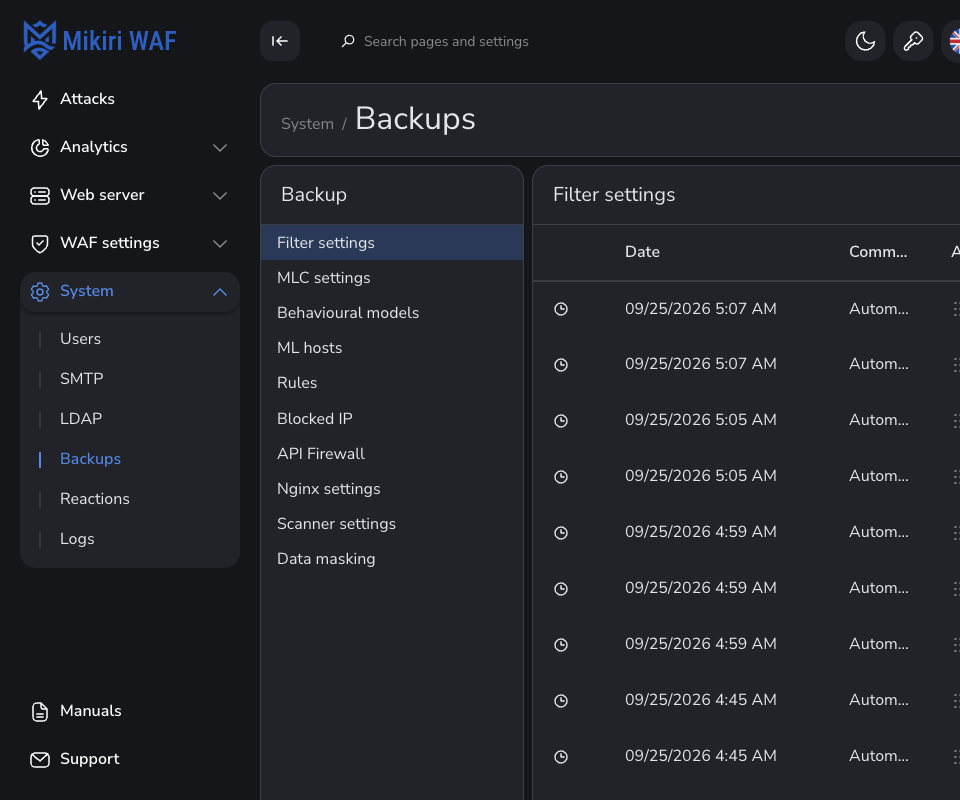
The API for the same objects is Backup of agent settings.
¶ Reactions
Reactions is the queue of review requests: a date, a CID, a host, a result, a status, and who sent it. The sender address uses the free width of the row. Actions is wide enough for the heading. Filters narrow the list by result, status, and sender. Search comments looks through the text. Create an exception rule opens a rule for the selected request. Action log is the history of that request.
¶ Logs
Logs is the action log of the console: who signed in, who changed an account who created, updated, or deleted a setting. A row is the date, the address, the role, the action, the section the client address.
Filters narrows the list. Export CSV downloads it. Delete selected removes the chosen rows. Records found is the count for the current filters.
Event log is the agent event list on the same page. Its filters select a level, an agent, an address, an installation id, and a category. A selected row is highlighted, without a second check mark. Category names are capitalized. Brute-force is written with a hyphen. A scanner module such as Crawler or Recheck uses the same form.