Filter asks a blocked visitor to solve a CAPTCHA and keeps the browser on the address of the protected site. It connects to waf_ban_captcha_url on its own and reads x-waf-captcha-challenge from the answer. waf_ban_captcha_host lists the hosts whose visitors may unblock an address this way. waf_antibot_captcha_url adds the same check after the anti-bot page.
Mikiri WAF CAPTCHA is the application installed below. gCAPTCHA is another application that answers with the same header.
CAPTCHA unblocking applies to IP addresses that MLC has identified as the source of a brute-force, flood, or DDoS attack. Before enabling it, make sure that using a CAPTCHA service complies with applicable law.
¶ Interaction
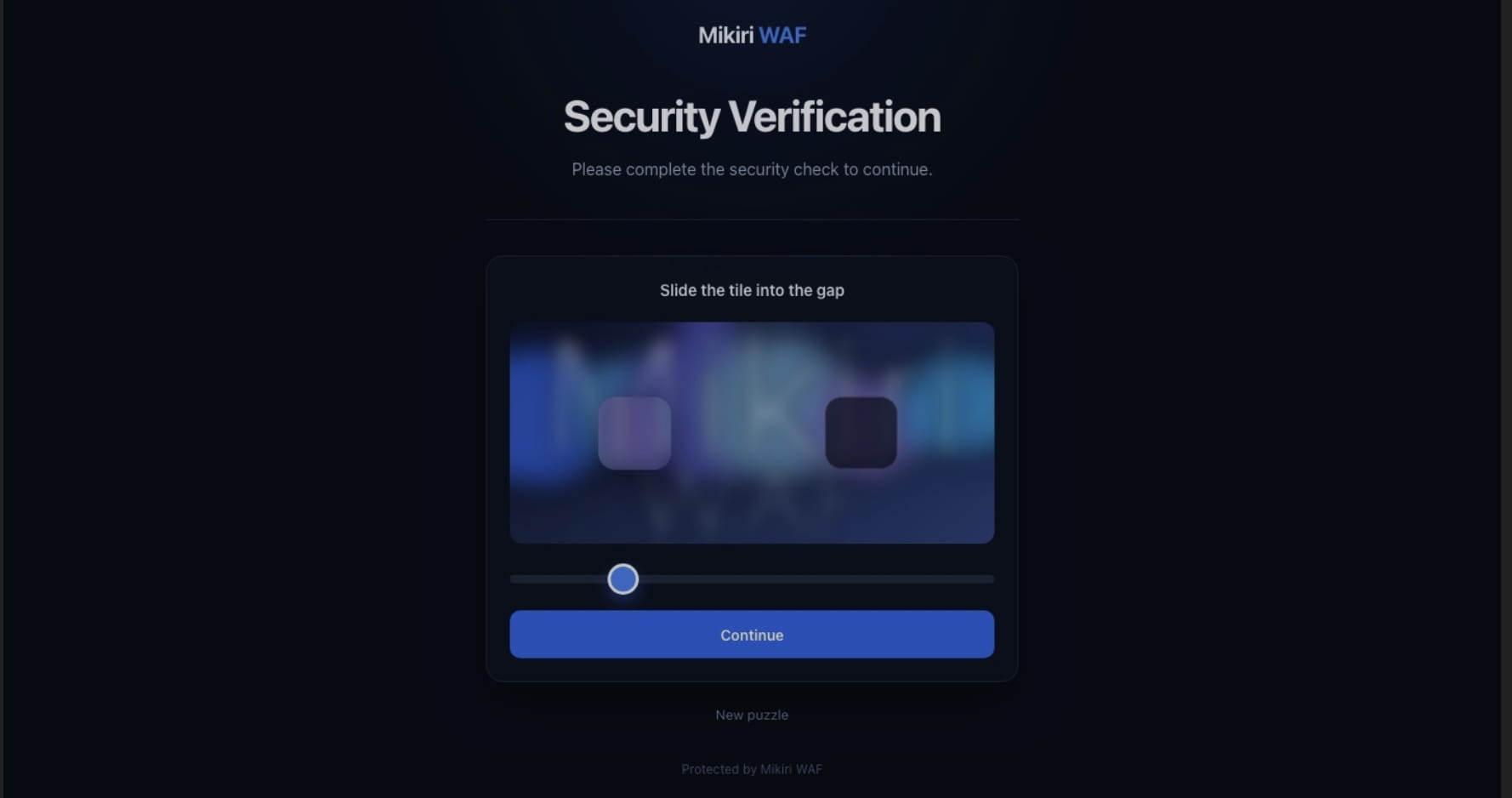
The visitor stays on the address of the protected site. The filter opens its own connection to the address from waf_ban_captcha_url, forwards the visitor's request there reads the response header x-waf-captcha-challenge. The visitor sees this page:
The exchange works as follows:
- The visitor requests the protected site. The filter starts the CAPTCHA exchange in either of these cases:
- the IP address is blocked by MLC as a brute-force, flood, or DDoS attempt the host is listed in
waf_ban_captcha_host; - anti-bot mode is enabled for the URL, the visitor has already passed the anti-bot page, the URL is listed in
waf_antibot_captcha_urlthis IP address has not passed the CAPTCHA check yet.
- the IP address is blocked by MLC as a brute-force, flood, or DDoS attempt the host is listed in
- The filter connects to Mikiri WAF CAPTCHA and forwards the visitor's request: the method, the path and a request body of up to 64 KB. A path in
waf_ban_captcha_urlis prepended to that URI. The filter adds the visitor IP address, the host, the original path and the scheme drops anyx-waf-captcha-*header supplied by the visitor. - Mikiri WAF CAPTCHA answers every path except its own
/captchaand/verifyendpoints with the verification page and the headerx-waf-captcha-challenge: progress. The challenge is a slider puzzle stored in Memcached for 60 seconds. - The filter removes the service header and returns the page to the visitor. On the first answer it sets the cookie
mikiri-waf-captchawith the original URI, so the following CAPTCHA steps still know which page to open. The cookie lives for 300 seconds, isHttpOnly, usesSameSite=Laxis markedSecureon HTTPS. - The page loads the image from
/captchaand submits the answer to/verify. Both requests go to the protected site, so the filter forwards them to Mikiri WAF CAPTCHA while the IP address is still blocked. - Mikiri WAF CAPTCHA reports the result in
x-waf-captcha-challenge:progress— the answer is wrong, the session is unknown, or a new challenge was issued. The filter shows the page again the IP address stays blocked. A solved challenge cannot be submitted again.complete— the answer is correct. The filter removes the IP address from the block list, writesIP … is unbanned after passing the CAPTCHAto the filter log notifies MLC. The visitor receives a page that opens the original URL after one second.
- The following request is processed as a normal request and reaches the protected application.
A response without x-waf-captcha-challenge, or with any other value, is a failed exchange. The filter logs it and asks Mikiri WAF CAPTCHA for the verification page once more. If that answer is also unusable, the visitor receives the status code of Mikiri WAF CAPTCHA (from 400 to 599) or 502 when the application did not answer. A stopped Memcached makes Mikiri WAF CAPTCHA return 500 without the service header the filter passes that code to the visitor.
When waf_antibot_captcha_url is set, a passed CAPTCHA also marks the IP address as verified for anti-bot mode. The mark is kept for 24 hours and is synchronized between the Filter nodes of the cluster. The anti-bot page itself is described in Anti-bot mode.
¶ Installing Mikiri WAF CAPTCHA
Install the application on the Filter server, or run it as a Docker container. A package installation listens on 127.0.0.1:8080 and stores challenge sessions in Memcached on 127.0.0.1:11211.
- Install the packages and download the application:
apt update && apt install -y python3 python3-venv python3-pip memcached git
cd /var/www/
git clone https://github.com/mikiri-waf/mikiri-waf-captcha
- Create the virtual environment and install the dependencies:
python3 -m venv /var/www/mikiri-waf-captcha/venv
/var/www/mikiri-waf-captcha/venv/bin/python3 -m pip install --upgrade pip
/var/www/mikiri-waf-captcha/venv/bin/python3 -m pip install -r /var/www/mikiri-waf-captcha/requirements.txt
- Prepare the log directory, log rotation and the service unit:
mkdir -p /var/log/mikiri-waf/captcha
chmod 0750 /var/log/mikiri-waf/captcha
chown www-data:www-data /var/log/mikiri-waf/captcha
cp /var/www/mikiri-waf-captcha/misc/mikiri-waf-captcha /etc/logrotate.d/
cp /var/www/mikiri-waf-captcha/misc/mikiri-waf-captcha.service /lib/systemd/system/
systemctl daemon-reload
- Start Memcached and Mikiri WAF CAPTCHA:
systemctl enable --now memcached
systemctl enable --now mikiri-waf-captcha
The service runs as www-data from /var/www/mikiri-waf-captcha and starts Gunicorn with the settings in init.py.
- Check that the service is running and accepts connections:
systemctl status mikiri-waf-captcha
ss -ltnp | grep 8080
Application messages are written to /var/log/mikiri-waf/captcha/api.log. Gunicorn messages are written to /var/log/mikiri-waf/captcha/error.log.
¶ Application settings
The application is ready to use with the values shipped in the repository:
| Setting | Value | File |
|---|---|---|
| Listen address | 127.0.0.1:8080 |
init.py, parameter bind |
| Memcached | 127.0.0.1:11211 |
core.py |
| Challenge lifetime | 60 seconds | core.py, parameter sid_ttl |
If port 8080 on 127.0.0.1 is already in use, change bind in /var/www/mikiri-waf-captcha/init.py and restart the service. Use the same address in waf_ban_captcha_url.
To update the Python dependencies later:
/var/www/mikiri-waf-captcha/misc/pip_update.sh
systemctl restart mikiri-waf-captcha
¶ Connecting the filter
Set the address of the CAPTCHA application and the hosts that may use it. The same options connect Mikiri WAF CAPTCHA or another application that answers with the header x-waf-captcha-challenge, including the gCAPTCHA example. The call below replaces only the listed options. An array option is replaced as a whole; pass null to clear one option. The general rules of the call are described in Managing settings of the Filter.
curl http://api.example.com:8080/filter/v1/set_filter_settings --header 'Content-type: application/json' --data '{
  "key": "%PRODUCT KEY%",
  "set": {
    "waf_ban_captcha_url": "http://127.0.0.1:8080",
    "waf_ban_captcha_host": ["example.com", "web.example.com"],
    "waf_antibot_captcha_url": ["example.com/login/*"]
  }
}'
waf_antibot_captcha_url is optional. Omit it when CAPTCHA is used only to unblock brute-force, flood and DDoS blocks.
The same options can be set in WMC. Their reference is in Managing settings of the Filter.
¶ waf_ban_captcha_url
The address of Mikiri WAF CAPTCHA. The filter resolves it when the setting is applied and connects to it directly.
"waf_ban_captcha_url": "http://127.0.0.1:8080"
The value may include a scheme. Without a scheme the filter uses HTTP and port 80; with https:// it uses TLS and port 443. Mikiri WAF CAPTCHA listens on port 8080, so the port has to be written explicitly.
A path in this URL is a prefix of every request the filter sends to the application. The verification page requests /captcha and /verify at the root of the site the filter forwards those paths as they are. For Mikiri WAF CAPTCHA set the URL without a path, as in the example above.
waf_ban_captcha_host and waf_antibot_captcha_url take effect only together with this option. If either of them is set while waf_ban_captcha_url is empty, the filter reports the incomplete configuration in /var/log/mikiri-waf/filter/filter.log.
¶ waf_ban_captcha_host
Hosts whose visitors can unblock an IP address through Mikiri WAF CAPTCHA after a brute-force, flood, or DDoS block.
"waf_ban_captcha_host": [
    "example.com",
    "*.example.com"
]
The host format of the filter settings applies: a name, a wildcard, an IPv4 address, or an IPv6 address in square brackets.
¶ waf_antibot_captcha_url
URLs that receive an additional CAPTCHA check while anti-bot mode is enabled. The URL must also be listed in waf_antibot_url. After the visitor has passed the anti-bot page, a URL from this list is forwarded to Mikiri WAF CAPTCHA until this IP address passes the CAPTCHA.
"waf_antibot_captcha_url": [
    "example.com/login/*",
    "*.example.com/admin/admin.php"
]
The URL format applies. The option requires waf_ban_captcha_url.
¶ gCAPTCHA
gCAPTCHA in this example is reCAPTCHA v2, the checkbox widget. Filter does not call Google. It calls the application at waf_ban_captcha_url, and that application checks the token with siteverify.
Create a checkbox key in the reCAPTCHA admin console. In Label, enter a name for the site. Select Challenge (v2). Add each protected host name, such as example.com and web.example.com, and submit. A domain covers its subdomains, so example.com also allows web.example.com. A change to the domain list can take up to 30 minutes.
The console shows a site key and a secret for that key. RECAPTCHA_SITE_KEY is the site key. RECAPTCHA_SECRET is the secret. In the Google Cloud console the site key is the key ID. The secret is the legacy secret under Integration → Use Legacy Key, on the same page. The values SITE_KEY and SECRET below are placeholders. Replace them with this pair before starting the service. The site key is placed in the page. The secret stays on the application.
The visitor's browser loads the widget on the protected site, so the host in the address bar must be one of the key domains. An unknown site key makes the widget show ERROR for site owner: Invalid site key. Google draws that message in the browser. Filter returns the page it received from the application, and the application calls siteverify only after the form posts a token, so the Filter log and the application have no line for this message.
Listen on 127.0.0.1 and do not publish that port.
The visitor's browser loads https://www.google.com/recaptcha/api.js. The application calls https://www.google.com/recaptcha/api/siteverify. Send X-Waf-Captcha-Ip as remoteip: the TCP connection to the application is opened by Filter, so the peer address is not the visitor.
A token lasts two minutes and can be checked once. A missing or rejected token is answered with the page and x-waf-captcha-challenge: progress. A token Google accepts is answered with x-waf-captcha-challenge: complete and an empty body. Filter then unblocks the IP address and returns the page that opens the original URL. The form posts to /verify on the protected site. Leave waf_ban_captcha_url without a path, so Filter forwards that path unchanged.
Port 8090 leaves 8080 free for Mikiri WAF CAPTCHA. Save the program below as /opt/gcaptcha/gcaptcha.py after mkdir creates that directory. The service keeps the process running after the console closes and starts it again on boot.
#!/usr/bin/env python3

import json
import os
from html import escape
from http.server import BaseHTTPRequestHandler, ThreadingHTTPServer
from urllib.error import URLError
from urllib.parse import parse_qs, urlencode
from urllib.request import Request, urlopen

LISTEN = ("127.0.0.1", 8090)
SITEVERIFY = "https://www.google.com/recaptcha/api/siteverify"
HEADER = "x-waf-captcha-challenge"
MAX_BODY = 65536

SITE_KEY = os.environ["RECAPTCHA_SITE_KEY"]
SECRET = os.environ["RECAPTCHA_SECRET"]

PAGE = """<!DOCTYPE html>
<html lang="en">
<head>
  <meta charset="utf-8">
  <meta name="viewport" content="width=device-width, initial-scale=1">
  <title>Security verification</title>
  <script src="https://www.google.com/recaptcha/api.js" async defer></script>
</head>
<body>
  <form method="post" action="/verify">
    <div class="g-recaptcha" data-sitekey="%s"></div>
    <button type="submit">Continue</button>
  </form>
</body>
</html>
""" % escape(SITE_KEY, quote=True)


def accepted(token, remote_ip):
    fields = {"secret": SECRET, "response": token}
    if remote_ip:
        fields["remoteip"] = remote_ip
    request = Request(SITEVERIFY, data=urlencode(fields).encode(), method="POST")
    try:
        with urlopen(request, timeout=5) as response:
            result = json.load(response)
    except (OSError, URLError, ValueError):
        return False
    return result.get("success") is True


class Handler(BaseHTTPRequestHandler):
    def do_GET(self):
        self.page()

    def do_HEAD(self):
        self.page(body=False)

    def do_POST(self):
        path = self.path.split("?", 1)[0]
        if path != "/verify":
            self.page()
            return
        try:
            length = int(self.headers.get("Content-Length", "0"))
        except ValueError:
            length = 0
        if length < 0 or length > MAX_BODY:
            self.page()
            return
        raw = self.rfile.read(length)
        fields = parse_qs(raw.decode("utf-8", "replace"), keep_blank_values=True)
        token = fields.get("g-recaptcha-response", [""])[0]
        remote_ip = self.headers.get("X-Waf-Captcha-Ip", "")
        if token and accepted(token, remote_ip):
            self.complete()
            return
        self.page()

    def page(self, body=True):
        payload = PAGE.encode()
        self.send_response(200)
        self.send_header(HEADER, "progress")
        self.send_header("Content-Type", "text/html; charset=utf-8")
        self.send_header("Content-Length", str(len(payload)))
        self.end_headers()
        if body:
            self.wfile.write(payload)

    def complete(self):
        self.send_response(200)
        self.send_header(HEADER, "complete")
        self.send_header("Content-Length", "0")
        self.end_headers()

    def log_message(self, fmt, *args):
        return


if __name__ == "__main__":
    ThreadingHTTPServer(LISTEN, Handler).serve_forever()
mkdir -p /opt/gcaptcha
Save the program as /opt/gcaptcha/gcaptcha.py. www-data must be able to read that file. Then install the service:
cat > /etc/gcaptcha.env <<'EOF'
RECAPTCHA_SITE_KEY=SITE_KEY
RECAPTCHA_SECRET=SECRET
EOF
chmod 0600 /etc/gcaptcha.env
cat > /etc/systemd/system/gcaptcha.service <<'EOF'
[Unit]
Description=gCAPTCHA
After=network.target

[Service]
User=www-data
Group=www-data
EnvironmentFile=/etc/gcaptcha.env
ExecStart=/usr/bin/python3 /opt/gcaptcha/gcaptcha.py
Restart=on-failure

[Install]
WantedBy=multi-user.target
EOF
systemctl daemon-reload
systemctl enable --now gcaptcha
Replace SITE_KEY and SECRET before running the commands. systemd reads /etc/gcaptcha.env as root.
systemctl status gcaptcha
A missing key or an occupied port 8090 is recorded by journalctl -u gcaptcha. The invalid site key message is shown in the browser, as described above.
Point Filter at this application. The host list is the same list registered for the key.
curl http://api.example.com:8080/filter/v1/set_filter_settings --header 'Content-type: application/json' --data '{
  "key": "%PRODUCT KEY%",
  "set": {
    "waf_ban_captcha_url": "http://127.0.0.1:8090",
    "waf_ban_captcha_host": ["example.com", "web.example.com"]
  }
}'