Attacks is the page that opens at /. It lists recorded attacks for the signed-in account. It does not follow the CID selected in the header: the list can include hosts from every CID of the account.
The same records are returned by Attacks and anomalies. How to read one record is in Operate Mikiri WAF.
¶ Chart and period
The chart is the count of attacks over the selected range. The date control in the header of the page sets that range. Refresh reloads the list. Filters narrows it. Reset, on the right of the preset row, clears the applied filters and keeps the selected dates. Schema, port, blocking category, CID and country accept a value that is not in the suggestion list: type it and choose the row marked +. Delete is shown to an administrator. It removes records that match every filled field Delete all removes every record of the selected CIDs. The dialog shows how many records that would remove. Delete and Delete all ask for confirmation first, and Delete all says that every record of the selected CIDs will be removed. Deleting does not show a confirmation. Hovering the extra values behind +N lists their names, and the badge shows the full count, such as +3. Port, blocking category and CID in that dialog accept a value that is not in the suggestion list: type it and choose the row marked +.
The search box at the bottom of Filters matches a record when the text occurs in its IP address, host, port, method, scheme, country code, signature id, attack type, request id, blocking type, CID, or in the request and response content.
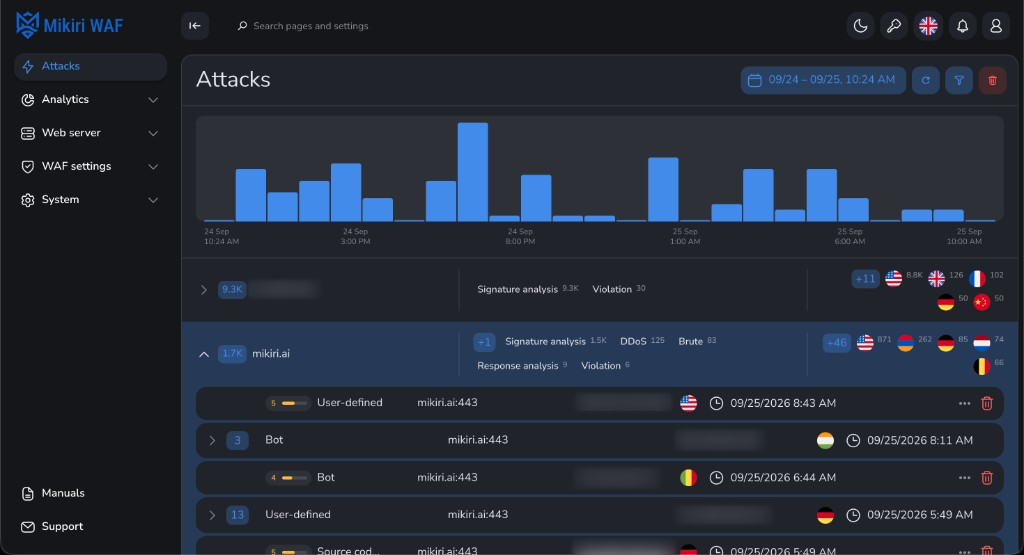
¶ Hosts
Under the chart, attacks are grouped by host. The badge is the count for that host. The line after the domain sits a short gap after that name. The domain row shows every detection tag. Country flags that do not fit stay behind +N. Expanding the row gives the flags less width, and the tags wrap onto another line when they still do not fit. Expanding a row lists the counts by detection type: API Firewall, signature analysis, MLA, MLC, flood, brute-force, DDoS, response analysis errors. A description that has only one source address is a single row: it shows that address and opens straight onto the records. Each record shows the country flag of its source address. When the record has no country code, the flag is taken from the GeoIP lookup for that address. ISO 3166-1 codes, including territories such as Hong Kong and Macao, and Kosovo (XK) have their own flags. Hovering an address asks for the extended GeoIP card (city, network, organisation). The country flag is stored on the record itself, so the flag can be shown when that card has no data.
Drag the boundary between the description, host, address and time columns to resize them. A double-click shrinks that column to the width of its content. The widths are remembered in this browser. A record detected by a behavioural model shows a brain beside the host: green while that host is not training, yellow while training is in progress. Hovering the brain says the record was detected by Mikiri AI. While that host is training, the next line says the model is training and gives the percentage. A record that was not blocked is marked NB. When that record is also in detection mode, only DM is shown.
An administrator can delete every record of a host, or of a description or address group, from the delete control on that heading. A heading that is a single record keeps the delete control on the record. An opened record is inset equally from the left and right of its card. Records listed under a heading use the same column positions as that heading.
Opening a record lists the request and response zones. Line breaks in the request body and the response body stay as line breaks. When that body is a JSON object or array, it is indented by two spaces. The request body, the response body, the headers and the response headers scroll once they take more than ten lines. A body longer than the display limit is not drawn there: Content is too large downloads the full zone.
Records found is the number of attacks in the current range and filters.
¶ Business risk
Each record shows a mark from 1 to 10. Hover it for the class name and a short note on the business impact. The mark is coloured by band: 1–3 is low, 4–6 is medium, 7–8 is high, and 9–10 is critical. WL, Logger, and Internal error have no mark. An exclusion rule, an audit record, and a WAF fault are not attacks.
The description decides the score when it names a known class. Otherwise the blocking type decides it. An MLA record that is also remote code execution stays in that class. A description or a blocking type that is not listed scores 4.
| Score | Band | Meaning |
|---|---|---|
| 1–3 | Low | Little or no direct business harm |
| 4–6 | Medium | Service quality, data leakage, or account abuse is plausible |
| 7–8 | High | Confidentiality or availability of a product is at risk |
| 9–10 | Critical | Remote takeover or an equivalent loss of control |
| Description | Class | Score |
|---|---|---|
| RCE, OSCI | Remote code execution | 10 |
| SSTI | Remote code execution | 9 |
| UWA | Unauthorized web access | 8 |
| SQLi, NoSQLi | Injection | 9 |
| Injection | Injection | 8 |
| XSS | Cross-site scripting | 7 |
| RFI, LFI | File access | 8 |
| Archive access, source-code discovery | File access | 5 |
| WAF bypass | Control bypass | 7 |
| Web scraping | Web scraping | 6 |
| Scanner, bot | Reconnaissance | 4 |
| Suspicious access | Reconnaissance | 3 |
| User-defined | Other | 5 |
| Other | Other | 4 |
| Blocking type | Class | Score |
|---|---|---|
| MLA, MLC | Behavioural model | 7 |
| Antivirus | Malware | 8 |
| DDoS | Denial of service | 6 |
| Brute-force, flood | Account abuse | 6 |
| API Firewall | Protocol abuse | 6 |
| Autoban, blocked IP | Account abuse | 5 |
| Basic analysis, response analysis | Other | 5 |
| RFC violation | Protocol abuse | 3 |